Stop re-explaining your project to your AI
PMB gives Claude Code, Codex, Cursor, and other MCP agents a shared private memory. It remembers project decisions, lessons, goals, and past work, then injects the relevant context before the next answer.
SQLite is the durable source of truth. Rebuildable search indexes stay local. No cloud account, API key, telemetry, or LLM call on the read path.
4-16 ms Warm prepare call with project context, lessons, and goals.
Zero cloud accounts Your memory and search indexes remain on your machine.
10 core tools A small default MCP surface instead of dozens of competing choices.
Measured impact PMB reports when the evidence is useful, harmful, or insufficient.
Same prompt. The difference is memory.
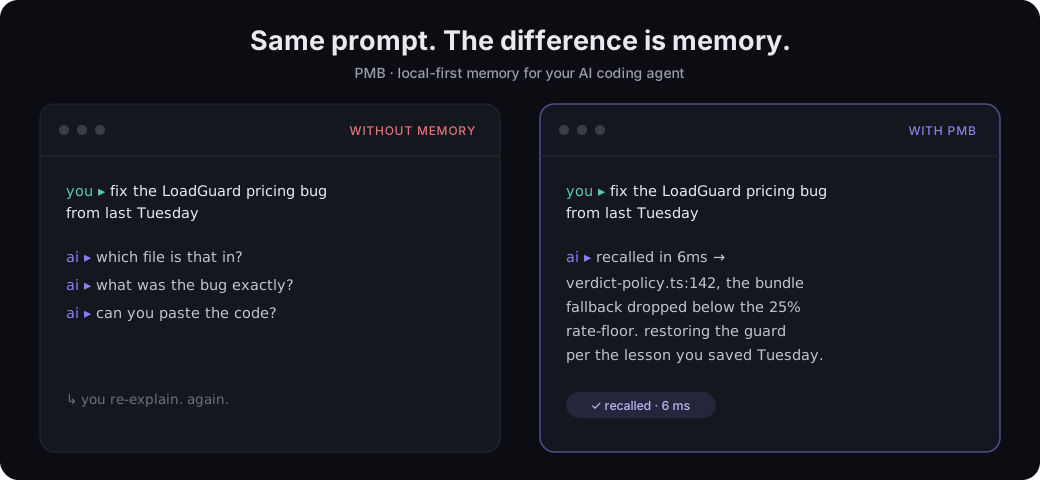
Without memory, the next session starts with clarifying questions. With PMB, the agent can recover the relevant file, decision, and rule before it starts acting.
Install once, then keep working
Restart your agent and talk normally. PMB handles the memory loop in the
background. Prefer npm? npx pmb-ai setup runs the same setup flow.
Open the setup guide Browse the source
Why PMB feels different
Memory shows up before the model thinks
Hooks and the prepare tool surface relevant context at the start of the task, instead of waiting for the agent to remember to search.
One memory across agents Claude Code, Codex, Cursor, Windsurf, Zed, VS Code, and other MCP clients can share the same workspace.
It measures whether lessons help Earned Memory joins surfaced lessons to test, build, deploy, and red-to-green outcomes, with conservative confidence checks.
You own every byte SQLite is the source of truth, exports are open, deletion is explicit, and optional network features stay opt-in.
The loop
flowchart LR
  Request["Your request"] --> Prepare["Prepare context"]
  Prepare --> Memory{"Relevant memory?"}
  Memory -->|Yes| Act["Agent acts informed"]
  Memory -->|No| Quiet["PMB stays quiet"]
  Quiet --> Act
  Act --> Record["Save durable outcome"]
  Record --> Next["Better next session"]
Evidence, with the caveats visible
| Signal | Current measured result |
|---|---|
| Warm recall p50 / p95 | 35 ms / 110 ms |
Warm prepare(message) |
4-16 ms |
| LoCoMo recall@10 | 94.5% |
| Multilingual stress top-10 | 99.2% |
Retrieval quality and real-world outcome impact are different questions. PMB
reports them separately and says insufficient when the outcome sample is too
small to support a conclusion.
Read the measurement methodology Inspect the benchmarks
Ready to give your agent a memory?
PMB is Apache-2.0 licensed and runs on Linux, macOS, and Windows.